


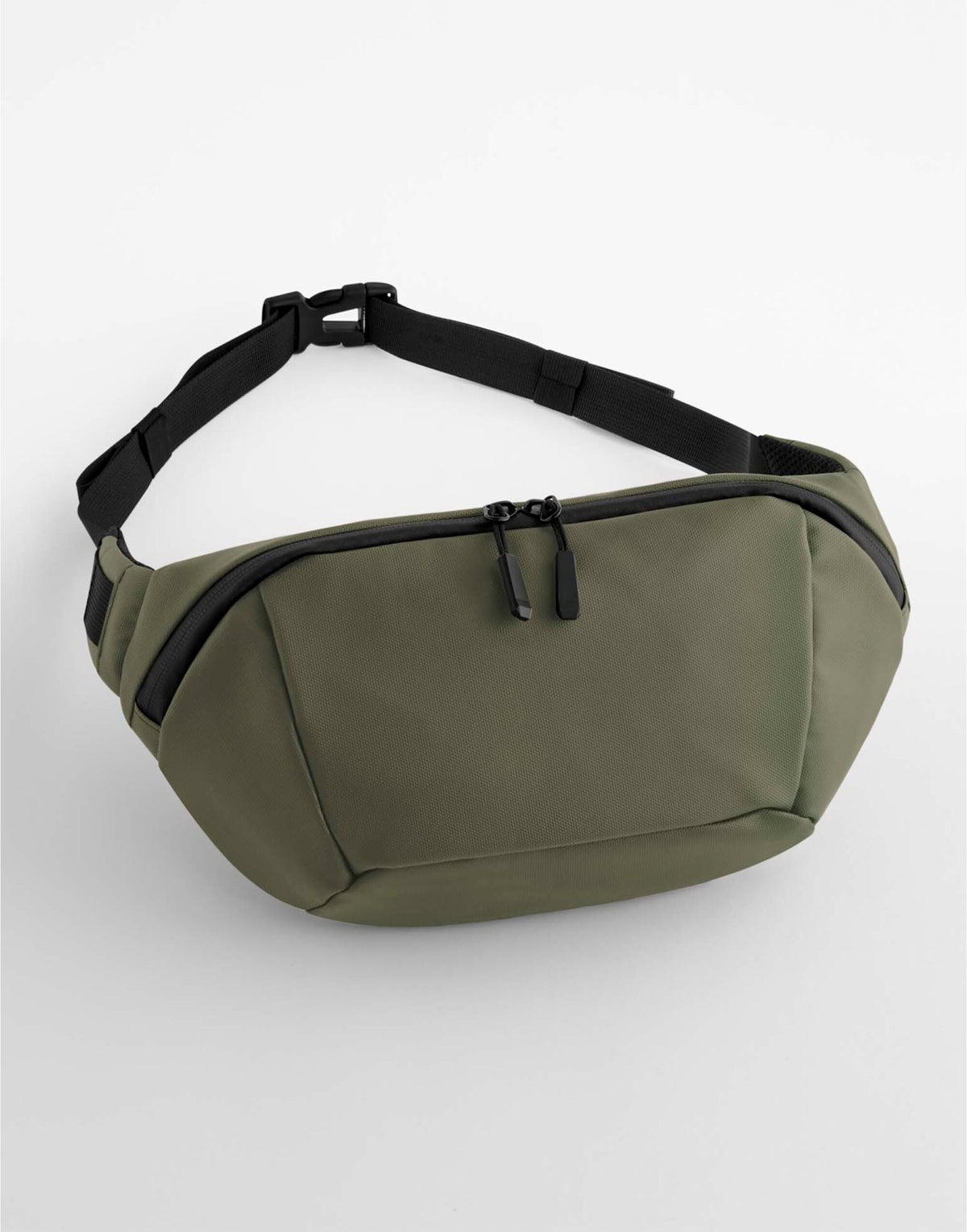

Bagbase BG346 Everyday Carry 5Litre Cross Body
- Contains 100% GRS certified recycled polyester, certified by Control Union CU811033
- Hidden external zippered valuables pocket
- Two internal padded slip pockets
- Internal zippered mesh pocket
- Water resistant zip closures
- Multi-purpose attachment loops
- Fully adjustable waist strap
- TearAway label for ease of rebranding
Product specification
- Brand: Bagbase
- Product code: BG346
- Fabric: 100% Recycled 900D Polyester with PU coating
- Fabric weight: Product Approx: 215g
Explore more Bags & Backpacks.
Blank purchase only. This product is not available for printing or embroidery in Printlab.
Pairs well with
Bagbase BG346 Everyday Carry 5Litre Cross Body
Everything you can do in LabStudio
See all tools: Design
- Upload – add your own logo, photo or artwork.
- Designs – pick from our ready-made artwork library.
- Text – add names, slogans or any wording.
- Add – place more text or artwork on the garment.
- Layers – select and reorder every part of your design.
- Properties – fine-tune the item you have selected.
- Undo, Redo and History – step back or forward through your changes.
- Save – keep your design to come back to it.
See all tools: Canvas and preview
- Move, Resize and Zoom – position your design exactly where you want it.
- Grid, Rulers and Snap guides – line everything up neatly.
- Safe print area – shows the area that will be printed.
- Dark studio mode – an easier view on dark garments.
- Realistic fabric view – see your design on real fabric texture.
- Front / back compare – check both sides together.
- Download mockup JPG – save a picture of your design to share.
See all tools: Product and print
- Print areas – Front, Back, Left sleeve, Right sleeve and Neck label.
- Colours – switch the garment colour and see your design on it.
- DTF print or Embroidery – choose how your design is made.
- Change product – choose Collection, then Brand, Product and Colour, and keep your design.
- Price breakdown – see what your design costs before you order.
See all tools: LabStudio AI
- AI artwork – create artwork from a short description.
- AI text designs – turn your words into styled text designs.
- AI photo tools – work on your photos in seconds.
- Clothing previews – see your design on the garment before you buy.
- Plan – 600 AI images for £29 a month.
Design your own clothing in minutes. Upload your logo or pick from our artwork library, add text and layers, choose the product, colour and print area, then preview it before you order. Open each group below to see every tool.
Find answers about personalisation, delivery and your order, or contact our team.
-
Delivery
View our shipping policy for delivery options and times.
-
Contact our team
Email support@usastarfashion.com or use our contact page.
-
Personalisation help
Choose your colour and size first. On supported products, open Printlab to add text, artwork or a logo. Review your design and total before adding it to your basket.
-
Returns
Read our returns policy or contact us about your order.
Before you order
Personalising your product
Choose your colour and size first. On supported products, open Printlab to add text, artwork or a logo. Review your design and total before adding it to your basket.
Choosing a size and colour
Use the product options and product description to check the available colours, sizes and details before ordering.
Delivery information
View our shipping policy for delivery options and times.
Returns and order help
Read our returns policy or contact us about your order.
FAQs
How do I add my own design?
Choose your colour and size first. On supported products, open Printlab to add text, artwork or a logo. Review your design and total before adding it to your basket.
Can I choose my size and colour?
Yes. Select from the available product options before personalising or adding to your basket.
Where can I check delivery information?
View our shipping policy for delivery options and times.
How do I get help with my order?
Use our contact page and include your order number if you have one.
More answers are available in our FAQs.
Brand and personalisation information
Third-party brand names, trade marks and logos remain the property of their respective owners. USASTARFASHION is an independent retailer; naming a brand to identify a product does not imply its sponsorship, endorsement or an official partnership unless expressly stated. Where printing, embroidery or other personalisation is offered, that service is arranged by USASTARFASHION independently of the original brand owner.