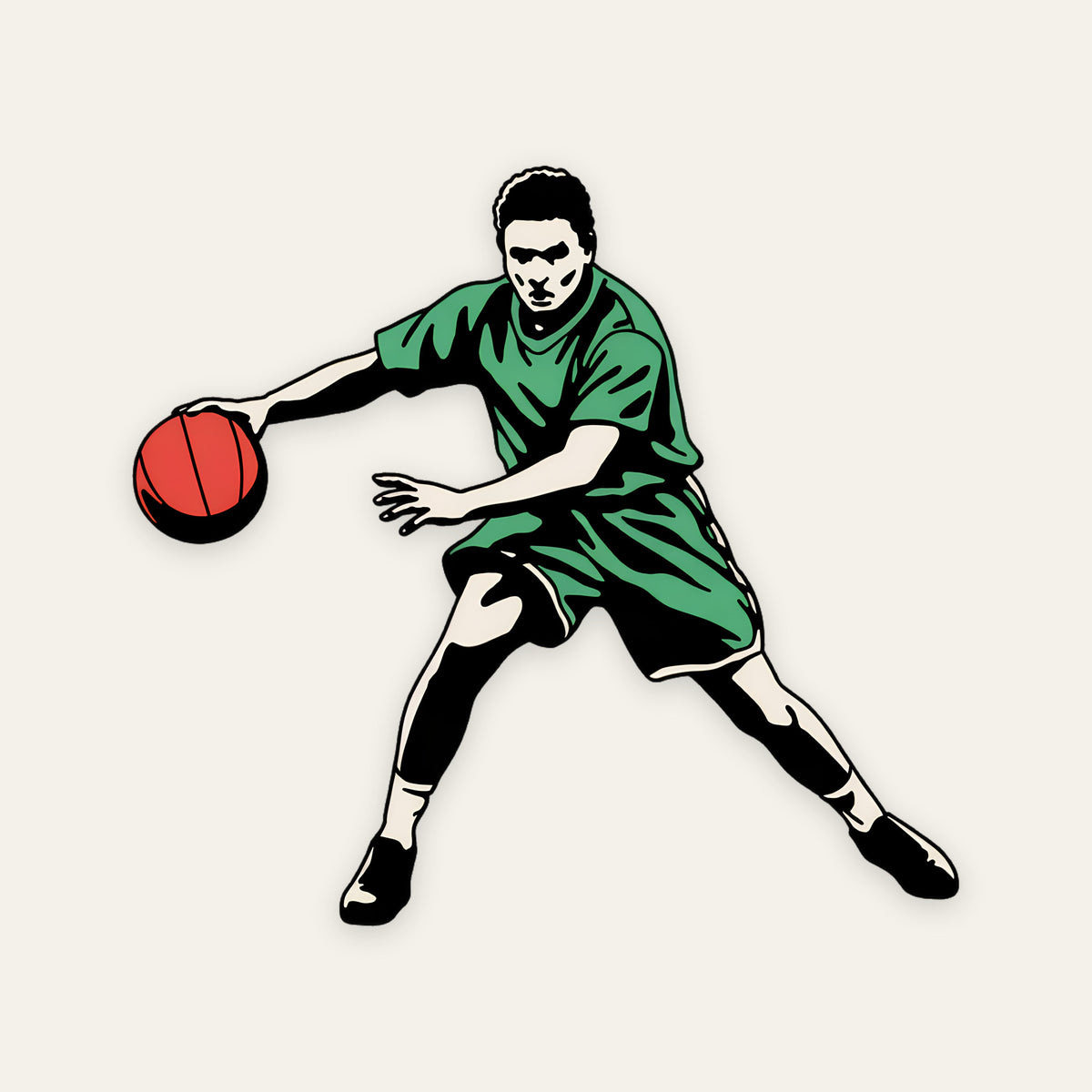
Crossover — Basketball & Hoops Print
USASTARFASHION STUDIO · USF-P128
Press-Ready Artwork
High-resolution transparent PNG of Crossover — Basketball & Hoops Print from our Basketball & Hoops collection — built for DTF, DTG, and sublimation transfers.
- Instant download email after checkout, plus access from your order status page
- Unlimited commercial print use
- 300 DPI transparent background
This DTF artwork is supplied as a single press-ready PNG so you can print it on garments, transfers, or merch without extra cleanup.
VOLUME SAVINGS AT CHECKOUT
Savings apply automatically in the Prints collection: 3 prints 10% off · 5 prints 15% off · 10 prints 25% off · 15 prints 35% off.
Digital file only — nothing is posted or shipped. After payment, your file is sent by email and remains available on the order status page.
USASTARFASHION · LABSTUDIO
Your artwork.
Ready to print.
Find a design. Make it yours. Prepare your halftone and arrange your print sheet — all in LabStudio.
Free practice demo · No login · No credits usedSign in to the full Studio for your saved projects and available AI credits.


Choose your artwork. Create your own finish.
Fine-tune your artwork for DTF.
Arrange. Rotate. Make room for more.
 Your selected product
PRINTLAB · YOUR CREATIVE STUDIO
Wear your idea.
A name. A logo. A design that is yours. Choose your product and make it personal in LabStudio.
Add lettering or upload your own artwork. Position it on your chosen product.
Create colourful printed artwork for eligible clothing and accessories.
Choose a stitched finish and suitable embroidery artwork for eligible products.
Crossover — Basketball & Hoops Print
Try On is a visual preview, not a fit guarantee.
Free tools & optional AI membership
Use free text, artwork, halftone and gang-sheet tools. Sign in to personalise. Products, printing and embroidery are charged separately.
Optional AI membership is £29/month for 600 AI images, covering AI text, artwork and LabStudio clothing previews and the Virtual changing room. Cancel through Manage / cancel subscription to stop future renewals. Explore the AI plan
Eligible new accounts get a one-time free trial of 103 credits (about 51 AI images) for 7 days from first credit-account use, or until they run out. No paid subscription starts automatically.
1 AI image = 2 credits. Monthly credits expire one calendar month after payment and don’t roll over. Extra credits cost £5 for 300 extra images and last 60 days. Failed images are free.
Combineert goed met
Crossover — Basketball & Hoops Print
Everything you can do in LabStudio
See all tools: Design
- Upload – add your own logo, photo or artwork.
- Designs – pick from our ready-made artwork library.
- Text – add names, slogans or any wording.
- Add – place more text or artwork on the garment.
- Layers – select and reorder every part of your design.
- Properties – fine-tune the item you have selected.
- Undo, Redo and History – step back or forward through your changes.
- Save – keep your design to come back to it.
See all tools: Canvas and preview
- Move, Resize and Zoom – position your design exactly where you want it.
- Grid, Rulers and Snap guides – line everything up neatly.
- Safe print area – shows the area that will be printed.
- Dark studio mode – an easier view on dark garments.
- Realistic fabric view – see your design on real fabric texture.
- Front / back compare – check both sides together.
- Download mockup JPG – save a picture of your design to share.
See all tools: Product and print
- Print areas – Front, Back, Left sleeve, Right sleeve and Neck label.
- Colours – switch the garment colour and see your design on it.
- DTF print or Embroidery – choose how your design is made.
- Change product – choose Collection, then Brand, Product and Colour, and keep your design.
- Price breakdown – see what your design costs before you order.
See all tools: LabStudio AI
- AI artwork – create artwork from a short description.
- AI text designs – turn your words into styled text designs.
- AI photo tools – work on your photos in seconds.
- Clothing previews – see your design on the garment before you buy.
- Plan – 600 AI images for £29 a month.
Design your own clothing in minutes. Upload your logo or pick from our artwork library, add text and layers, choose the product, colour and print area, then preview it before you order. Open each group below to see every tool.
Vind antwoorden over personalisatie, levering en uw bestelling, of neem contact op met ons team.
-
Levering
Bekijk ons verzendbeleid voor bezorgopties en -tijden.
-
Neem contact op met ons team
Email support@usastarfashion.com or use our contact page.
-
Hulp bij personalisatie
Kies eerst uw kleur en maat. Op ondersteunde producten opent u Printlab om tekst, illustraties of een logo toe te voegen. Controleer uw ontwerp en totaal voordat u het aan uw winkelmandje toevoegt.
-
Retouren
Lees ons retourbeleid of Neem contact met ons op over uw bestelling.
Voordat u bestelt
Personaliseren van uw product
Kies eerst uw kleur en maat. Op ondersteunde producten opent u Printlab om tekst, illustraties of een logo toe te voegen. Controleer uw ontwerp en totaal voordat u het aan uw winkelmandje toevoegt.
Een maat en kleur kiezen
Gebruik de productopties en productbeschrijving om de beschikbare kleuren, maten en details te controleren voordat u bestelt.
Bezorginformatie
Bekijk ons verzendbeleid voor bezorgopties en -tijden.
Hulp bij retourneren en bestellen
Lees ons retourbeleid of Neem contact met ons op over uw bestelling.
Veelgestelde vragen
Hoe voeg ik mijn eigen ontwerp toe?
Kies eerst uw kleur en maat. Op ondersteunde producten opent u Printlab om tekst, illustraties of een logo toe te voegen. Controleer uw ontwerp en totaal voordat u het aan uw winkelmandje toevoegt.
Kan ik mijn maat en kleur kiezen?
Ja. Maak een keuze uit de beschikbare productopties voordat u uw winkelmandje personaliseert of toevoegt.
Waar kan ik de bezorginformatie controleren?
Bekijk ons verzendbeleid voor bezorgopties en -tijden.
Hoe krijg ik hulp bij mijn bestelling?
Gebruik onze contactpagina en vermeld uw bestelnummer als u er een heeft.
Meer antwoorden zijn beschikbaar in onze Veelgestelde vragen.
Brand and personalisation information
Third-party brand names, trade marks and logos remain the property of their respective owners. USASTARFASHION is an independent retailer; naming a brand to identify a product does not imply its sponsorship, endorsement or an official partnership unless expressly stated. Where printing, embroidery or other personalisation is offered, that service is arranged by USASTARFASHION independently of the original brand owner.