
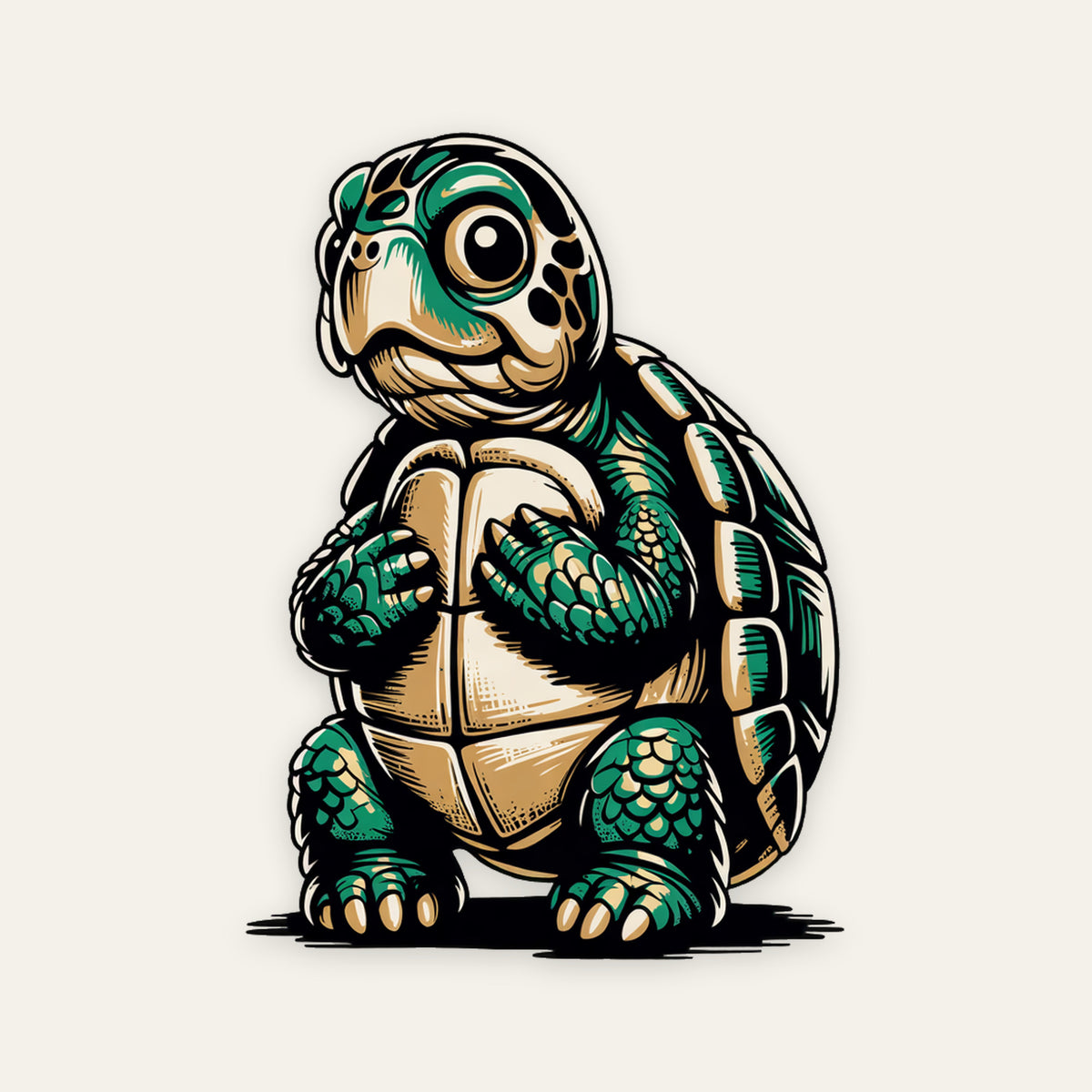
Nope Turtle — Funny & Sarcastic Print
USASTARFASHION STUDIO · USF-P082
Press-Ready Artwork
High-resolution transparent PNG of Nope Turtle — Funny & Sarcastic Print from our Funny & Sarcastic collection — built for DTF, DTG, and sublimation transfers.
- Instant download email after checkout, plus access from your order status page
- Unlimited commercial print use
- 300 DPI transparent background
This DTF artwork is supplied as a single press-ready PNG so you can print it on garments, transfers, or merch without extra cleanup.
VOLUME SAVINGS AT CHECKOUT
Savings apply automatically in the Prints collection: 3 prints 10% off · 5 prints 15% off · 10 prints 25% off · 15 prints 35% off.
Digital file only — nothing is posted or shipped. After payment, your file is sent by email and remains available on the order status page.
USASTARFASHION · LABSTUDIO
Do shaothar ealaíne.
Réidh le priontáil.
Aimsigh dearadh. Déan leatsa é. Ullmhaigh do leath-thonach agus socraigh do bhileog phriontála — ar fad i LabStudio.
Taispeántas cleachtaidh saor in aisce · Gan logáil isteach · Ní úsáidtear aon chreidmheasSínigh isteach sa Stiúideo iomlán le haghaidh do thionscadail shábháilte agus creidmheasanna AI atá ar fáil.


Choose your artwork. Create your own finish.
Fine-tune your artwork for DTF.
Arrange. Rotate. Make room for more.
 Your selected product
PRINTLAB · DO stiúideo cruthaitheach
Caith do smaoineamh.
A ainm. Lógó. Dearadh is leatsa. Roghnaigh do tháirge agus déan pearsanta é i LabStudio.
Cuir litreacha leis nó uaslódáil do shaothar ealaíne féin. Cuir ar do tháirge roghnaithe é.
Cruthaigh saothar ealaíne clóite ildaite le haghaidh éadaí agus gabhálais incháilithe.
Roghnaigh bailchríoch fuaite agus saothar ealaíne bróidnéireachta oiriúnach do tháirgí incháilithe.
Nope Turtle — Funny & Sarcastic Print
Réamhamharc amhairc é Try On, ní ráthaíocht oiriúnach.
Uirlisí saor in aisce & ballraíocht roghnach AI
Úsáid saor-théacs, saothar ealaíne, leathghloine agus uirlisí drong-bhileog. Sínigh isteach chun pearsanú. Gearrtar táirgí, priontáil agus bróidnéireacht ar leithligh.
Is ionann ballraíocht roghnach AI agus £29/mí le 600 íomhá AI le haghaidh téacs AI, saothar ealaíne agus réamhamhairc éadaí LabStudio agus an seomra feistis Fíorúil. Cealaigh trí Bainistigh / cuir an síntiús ar ceal chun stop a chur le hathnuachan amach anseo. Explore the AI plan
Faigheann cuntais incháilithe triail chreidmheasa 103 aonuaire le haghaidh laethanta 7 ó úsáid an chéad chuntais chreidmheasa. Ní thosaíonn aon síntiús íoctha uathoibríoch ón triail.
Téann creidmheasanna míosúla in éag mí féilire tar éis na híocaíochta. Cosnaíonn creidmheasanna breise £5 do 300 íomhá bhreise agus téann siad in éag tar éis laethanta 60. Fógrófar gnéithe amach anseo ar leithligh.
Péirí go maith le
Nope Turtle — Funny & Sarcastic Print
Everything you can do in LabStudio
See all tools: Design
- Upload – add your own logo, photo or artwork.
- Designs – pick from our ready-made artwork library.
- Text – add names, slogans or any wording.
- Add – place more text or artwork on the garment.
- Layers – select and reorder every part of your design.
- Properties – fine-tune the item you have selected.
- Undo, Redo and History – step back or forward through your changes.
- Save – keep your design to come back to it.
See all tools: Canvas and preview
- Move, Resize and Zoom – position your design exactly where you want it.
- Grid, Rulers and Snap guides – line everything up neatly.
- Safe print area – shows the area that will be printed.
- Dark studio mode – an easier view on dark garments.
- Realistic fabric view – see your design on real fabric texture.
- Front / back compare – check both sides together.
- Download mockup JPG – save a picture of your design to share.
See all tools: Product and print
- Print areas – Front, Back, Left sleeve, Right sleeve and Neck label.
- Colours – switch the garment colour and see your design on it.
- DTF print or Embroidery – choose how your design is made.
- Change product – choose Collection, then Brand, Product and Colour, and keep your design.
- Price breakdown – see what your design costs before you order.
See all tools: LabStudio AI
- AI artwork – create artwork from a short description.
- AI text designs – turn your words into styled text designs.
- AI photo tools – work on your photos in seconds.
- Clothing previews – see your design on the garment before you buy.
- Plan – 600 AI images for £29 a month.
Design your own clothing in minutes. Upload your logo or pick from our artwork library, add text and layers, choose the product, colour and print area, then preview it before you order. Open each group below to see every tool.
Find freagraí faoi phearsantú, seachadadh agus d'ordú, nó déan teagmháil lenár bhfoireann.
-
Seachadadh
Féach ar ár bpolasaí loingseoireachta le haghaidh roghanna seachadta agus amanna.
-
Déan teagmháil lenár bhfoireann
Email support@usastarfashion.com or use our contact page.
-
Cabhair phearsantaithe
Roghnaigh do dhath agus do mhéid ar dtús. Ar tháirgí tacaithe, oscail Printlab chun téacs, saothar ealaíne nó lógó a chur leis. Athbhreithnigh do dhearadh agus iomlán sula gcuirfidh tú le do chiseán é.
-
Tuairisceáin
Léigh ár bpolasaí tuairisceáin nó déan teagmháil linn faoi d'ordú.
Sula ndéanann tú ordú
Ag pearsanú do tháirge
Roghnaigh do dhath agus do mhéid ar dtús. Ar tháirgí tacaithe, oscail Printlab chun téacs, saothar ealaíne nó lógó a chur leis. Athbhreithnigh do dhearadh agus iomlán sula gcuirfidh tú le do chiseán é.
Roghnú méid agus dath
Úsáid na roghanna táirge agus cur síos ar an táirge chun na dathanna, méideanna agus sonraí atá ar fáil a sheiceáil roimh ordú.
Eolas seachadta
Féach ar ár bpolasaí loingseoireachta le haghaidh roghanna seachadta agus amanna.
Tuairisceáin agus cabhair a ordú
Léigh ár bpolasaí tuairisceáin nó déan teagmháil linn faoi d'ordú.
CCanna
Conas is féidir liom mo dhearadh féin a chur leis?
Roghnaigh do dhath agus do mhéid ar dtús. Ar tháirgí tacaithe, oscail Printlab chun téacs, saothar ealaíne nó lógó a chur leis. Athbhreithnigh do dhearadh agus iomlán sula gcuirfidh tú le do chiseán é.
An féidir liom mo mhéid agus mo dhath a roghnú?
Tá. Roghnaigh ó na roghanna táirge atá ar fáil roimh phearsantú nó cur le do chiseán.
Cén áit ar féidir liom faisnéis seachadta a sheiceáil?
Féach ar ár bpolasaí loingseoireachta le haghaidh roghanna seachadta agus amanna.
More ar fáil inár FAQs.
Brand and personalisation information
Third-party brand names, trade marks and logos remain the property of their respective owners. USASTARFASHION is an independent retailer; naming a brand to identify a product does not imply its sponsorship, endorsement or an official partnership unless expressly stated. Where printing, embroidery or other personalisation is offered, that service is arranged by USASTARFASHION independently of the original brand owner.